 Denys Hargrove
 Key Takeaways
- The Dacor oven F1 error code means a control board fault, which is why its symptoms vary so widely — from a frozen display to a door that won't unlock.
- A real share of F1 codes clear after a full two-minute power cycle at the breaker, especially after an outage or a surge elsewhere in the house.
- F1 that returns within the same day, or on every attempt to use the oven, behaves like a hardware fault rather than a transient event.
- A locked door alongside F1 is more urgent than a display fault alone — do not force the lock mechanism.
- Beeping alongside F1 is the board trying to alert you the same way it would for a safety fault, even though the issue is the board's own circuitry.
The Bottom Line
Try a full power cycle first, since a meaningful share of F1 codes are transient. If it returns the same day, or if the door has locked, stop trying to force a fix yourself and have the board properly diagnosed.
The Dacor oven F1 error code is the single most common question this site sees about the built-in oven line, and it arrives at an inconvenient moment nearly every time — mid-recipe, with a display that suddenly reads F1 instead of a temperature. F1 means a control board fault, and unlike a sensor or igniter code, it does not point at one obvious symptom. That is exactly why it confuses owners: the same code can look like a frozen display, a door that won't unlock, or an oven that simply stops responding to any button at all.
| What you notice | What the board is doing | What usually helps first |
|---|---|---|
| F1 appears, oven still heats | Board detected a fault but kept core functions running | Power cycle at the breaker |
| F1 appears, oven stops responding | Board has locked out to protect itself | Full power cycle, then a diagnostic if it returns |
| F1 after a power outage or surge | Board's memory was disrupted mid-operation | Usually clears on its own after a reset |
| F1 returns repeatedly on its own | Board hardware fault, not a transient event | Board replacement, confirmed by diagnosis |
| F1 with door locked and unresponsive | Lock mechanism affected by the same fault | Do not force the door — book a visit |
What Does the Dacor Oven F1 Error Code Actually Mean?
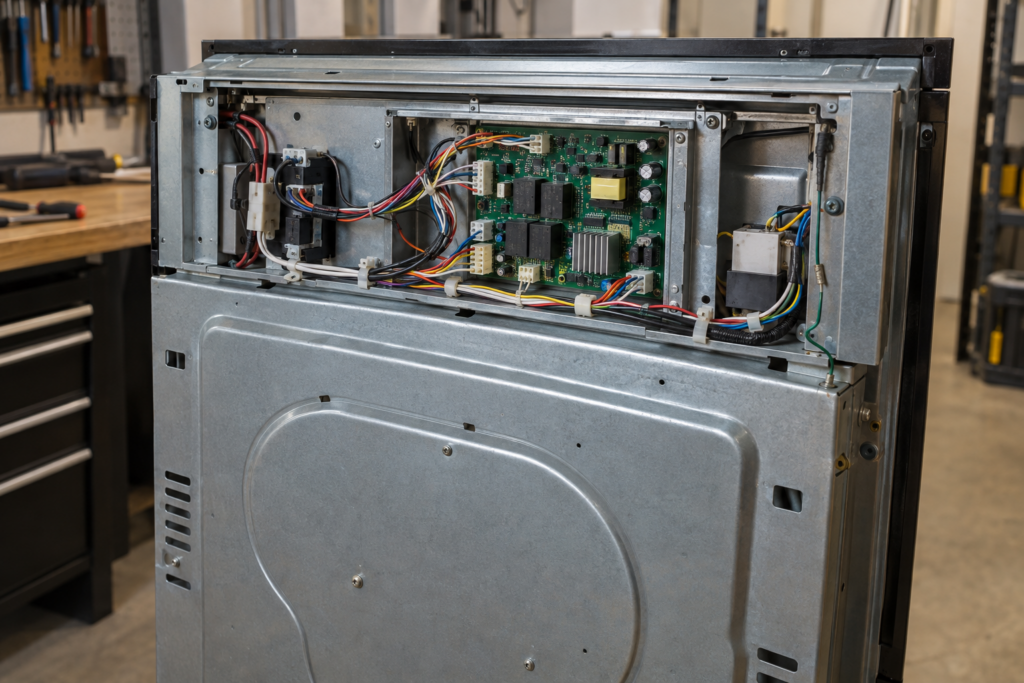
F1 means the oven's control board has detected an internal fault it cannot resolve on its own, which is a broader statement than most oven codes make. A temperature sensor code names one part; a door lock code names one mechanism. F1 names the part that is supposed to catch every other fault, which is why its symptoms vary so much from one oven to the next — a beeping display, a door that won't unlock, an oven that ignores every button, or one that keeps heating with no way to turn it off.
This is also why F1 shows up on both single and double wall ovens: whichever board is affected reports the same code, since the fault language is the same across the platform even when the physical board itself is not.
Does F1 Always Mean the Control Board Needs Replacing?
No — a real share of F1 codes clear after a proper power cycle and never come back. Ovens are exposed to the same power events as everything else in the kitchen: a brief outage, a surge from another appliance cycling on, a breaker that trips and resets. Any of those can leave a control board in a confused state that looks identical to a hardware fault until you have actually cleared it and watched what happens next.
- Switch off the breaker feeding the oven, not just the wall switch, for a full two minutes.
- Restore power and watch the display through its normal startup sequence before touching any buttons.
- Run a short, low-temperature bake to confirm the oven holds a setting rather than faulting again immediately.
- Note the exact behavior if F1 returns — same symptom, or something new — since that detail changes the diagnosis.
- Check whether the outage or surge affected other appliances in the kitchen at the same time, which points at the house circuit rather than the oven itself.
- Avoid repeatedly cycling power more than once or twice in a short window — it rarely helps beyond the first attempt and can mask a genuine hardware fault.
- Keep the oven's model and serial number handy before you call, since board part numbers vary across single and double wall oven platforms.
An F1 that returns within the same day, or that comes back on every attempt to use the oven, is behaving like a hardware fault rather than a one-time event, and no amount of repeated power cycling will change that outcome.
Handling a Locked Door During an F1 Fault
On some models, a control board fault can leave the self-clean lock engaged or unresponsive, which is more urgent than a simple display fault because it affects your ability to use the oven at all — not just the setting you wanted. Do not force the door mechanism; on nearly every Dacor wall oven the lock motor is not designed to be pried open, and doing so risks damaging a part that a technician could otherwise release safely.
If the door is locked and unresponsive after a full power cycle, treat that as a service call rather than a project, and mention the locked door specifically when you book — it changes how the technician prepares for the visit.
Why Is the Oven Beeping Along With the F1 Code?
A control board that is failing does not always fail quietly. Beeping alongside F1 is the board attempting to alert you the same way it would for a genuine safety fault, even though the underlying issue is with the board's own circuitry rather than the oven cavity. Our related guide on an oven beeping with an F2 code covers a related but distinct fault on the temperature sensor side — worth reading if your display has shown both codes at different times, since they point at different parts of the same control system.
- Continuous beeping with no code change after a power cycle suggests the board itself needs replacing.
- Beeping that stops after the reset but F1 remains on screen briefly is more consistent with a transient fault clearing.
- Intermittent beeping over several days, even without F1 staying visible, is worth logging by date and time before your visit.
- Beeping paired with a locked door should be treated as the more urgent of the two scenarios above.
- A single beep at power-up with no code following it is normal startup behavior, not a fault to chase.
Is the Oven Safe to Use While F1 Is Showing?
It depends on what else is happening alongside the code. An oven that shows F1 briefly and then returns to normal operation, holding temperature correctly, is generally safe to keep using while you arrange a diagnostic. An oven that keeps heating with no way to turn it off, or one whose door has locked unexpectedly, is not — in either case, cut power at the breaker rather than waiting to see what happens next.
If you are unsure which situation you are in, treat it as the more cautious one. A control board is the one component positioned to affect the oven's basic safety behaviors, and that is worth respecting even when the fault looks minor at first. Our guide to oven door safety covers what a stuck lock or an unresponsive control can mean beyond this specific code, and it is worth reading if F1 is not the only unusual behavior you have noticed recently.
Getting the Board Properly Diagnosed
Our oven not heating guide and our is it worth repairing a Dacor oven guide are both worth reading alongside this one if F1 is not the oven's first issue. Our Dacor oven repair service diagnoses control boards, sensors, and door lock assemblies together rather than replacing parts on a guess, with a diagnostic that starts from $95 and is credited toward the repair if you approve the work. If your oven's door has locked with F1 on the display, cut power at the breaker and book a visit rather than forcing it.